
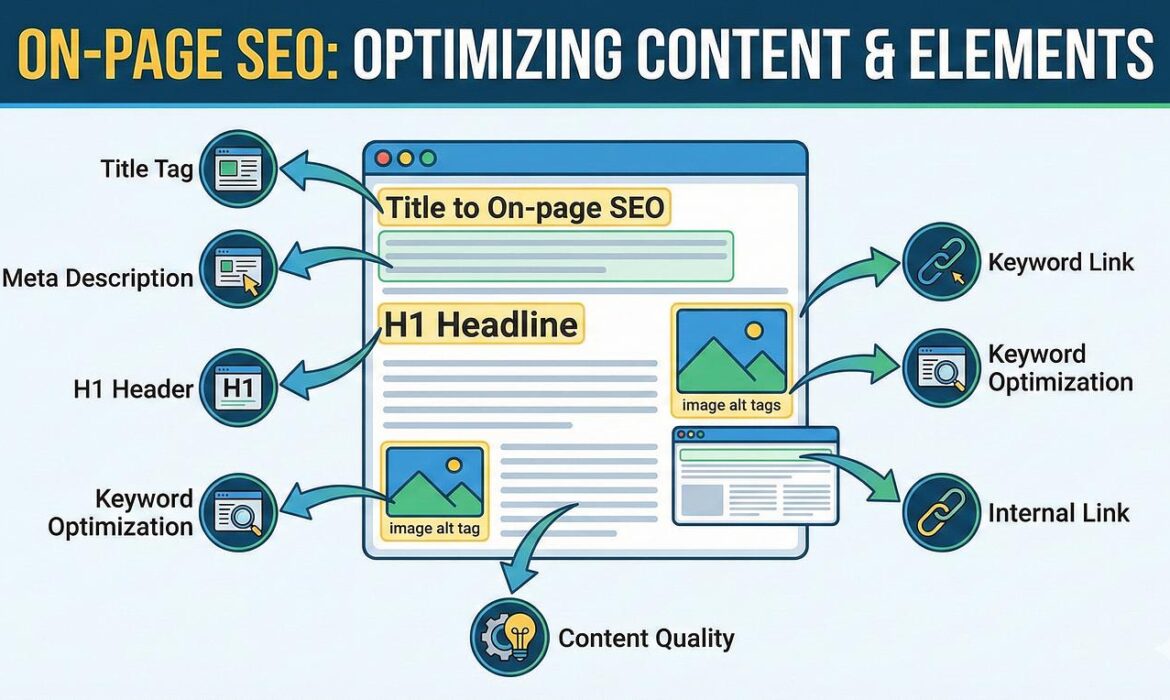
If your website has great content but isn’t appearing on Google’s first page, the problem is often poor On-Page SEO.
On-Page SEO is the process of optimizing every element on a webpage so search engines understand it better and users enjoy reading it. Unlike paid ads, good On-Page SEO continues to drive organic traffic for months or even years.
In this guide, you’ll learn the essential On-Page SEO techniques that every website owner should implement.
What is On-Page SEO?
On-Page SEO refers to all the optimizations you make inside your website, including:
- SEO Titles
- Meta Descriptions
- URL Structure
- Headings (H1–H6)
- Keyword Placement
- Images
- Internal Links
- External Links
- Content Quality
- User Experience
When done correctly, On-Page SEO helps search engines understand your content and increases your chances of ranking higher.
1. Write an SEO-Friendly Title Tag
Your title tag is one of the most important ranking factors.
Good Example
On-Page SEO Guide for Beginners (2026)Tips
- Keep it under 60 characters
- Include your main keyword near the beginning
- Make it compelling to encourage clicks
2. Create an Engaging Meta Description
Although meta descriptions are not a direct ranking factor, they improve your click-through rate.
Example:
Learn how to optimize your website with this complete On-Page SEO guide. Discover practical tips to improve rankings, traffic, and user experience.
Best Practices
- 140–160 characters
- Include the target keyword naturally
- Add a call to action
3. Use Clean, SEO-Friendly URLs
Bad URL
example.com/post?id=12345Good URL
example.com/on-page-seo-guideTips
- Use lowercase letters
- Separate words with hyphens (-)
- Keep URLs short and descriptive
4. Structure Your Headings Correctly
Use headings to organize your content.
H1 - Page Title

H2 - Main Sections

H3 - Subtopics

H4 - Supporting Details
Only use one H1 per page.
5. Place Keywords Naturally
Include your primary keyword in:
- Title
- Meta Description
- First paragraph
- One or two headings
- Image alt text
- URL (if appropriate)
- Conclusion
Avoid keyword stuffing—write for humans first.
6. Optimize Images


Images improve user engagement, but they should also be optimized.
Checklist
- Compress large images
- Use descriptive filenames
- Add relevant alt text
- Choose modern formats like WebP when possible
- Enable lazy loading
Example:
Filename
on-page-seo-checklist.webpAlt Text
On-Page SEO checklist for website optimization7. Add Internal Links
Internal links help visitors discover related content and help search engines understand your site structure.
Example:
- SEO Basics
- Keyword Research
- Technical SEO
- Link Building
- Local SEO
Link to relevant articles naturally throughout your content.
8. Link to Trusted External Sources
Citing authoritative sources can improve user trust.
Examples include:
- Google documentation
- Industry research
- Official statistics
Only link to reputable websites when they add value.
9. Improve Content Readability
Make your content easy to read by using:
- Short paragraphs
- Bullet points
- Numbered lists
- Clear headings
- Simple language
Good readability increases the time visitors spend on your website.
10. Optimize for Mobile Devices
Most users browse on smartphones.
Ensure your website has:
- Responsive design
- Fast loading
- Readable fonts
- Touch-friendly buttons
- Proper spacing
11. Increase Page Speed


A fast website improves both user experience and search rankings.
Speed optimization tips:
- Compress images
- Minify CSS and JavaScript
- Enable browser caching
- Use a CDN
- Choose quality hosting
12. Add Schema Markup
Schema helps search engines understand your content.
Common schema types:
- Article
- FAQ
- Organization
- Product
- Review
- Local Business
Rich results can improve your visibility in search.
13. Create Helpful, Original Content
Google rewards content that demonstrates:
- Experience
- Expertise
- Authority
- Trustworthiness
Focus on solving readers’ problems instead of simply adding keywords.
On-Page SEO Checklist
- ✅ SEO title optimized
- ✅ Meta description written
- ✅ One H1 tag
- ✅ Logical heading structure
- ✅ Primary keyword included naturally
- ✅ Images optimized
- ✅ Internal links added
- ✅ External links to trusted sources
- ✅ Mobile-friendly layout
- ✅ Fast loading speed
- ✅ Schema markup
- ✅ High-quality original content
Common Mistakes to Avoid
- ❌ Keyword stuffing
- ❌ Duplicate content
- ❌ Missing image alt text
- ❌ Slow-loading pages
- ❌ Multiple H1 tags
- ❌ Long, confusing URLs
- ❌ Thin or low-value content
- ❌ Broken internal links
Conclusion
On-Page SEO is the foundation of every successful website. By optimizing titles, headings, content, images, URLs, internal links, and page speed, you make it easier for both users and search engines to understand your content. Consistent optimization across every page can lead to higher rankings, increased organic traffic, and better user engagement over time.

