
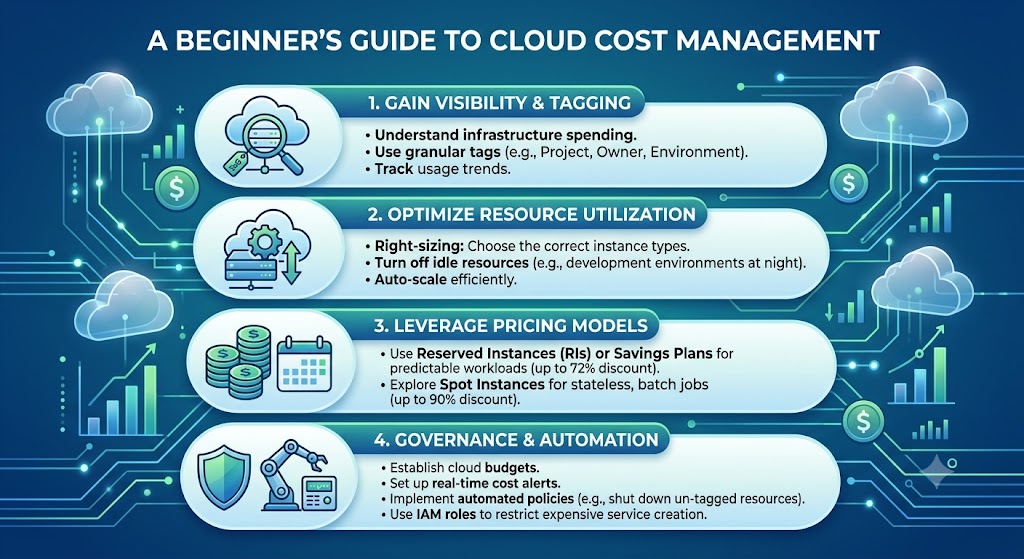
Cloud Cost Management: A Practical Beginner's Guide to Controlling Your Cloud Bill
Cloud computing can help businesses grow, but cloud costs can also become confusing if you do not monitor them carefully.
Many businesses and developers move their websites, applications, storage, and services to the cloud because of its flexibility. However, cloud services often work on usage-based pricing, which means your costs can change as your usage changes.
Understanding basic cloud cost management can help beginners avoid unnecessary spending and use cloud resources more efficiently.
What Is Cloud Cost Management?
Cloud cost management is the process of monitoring, understanding, and controlling the money spent on cloud services.
This may include costs for:
- Cloud servers
- Storage
- Databases
- Data transfer
- Backup services
- Software services
- Additional cloud resources
Why Can Cloud Costs Increase?
Cloud costs can increase for several reasons. A business may add more servers, store more data, receive more website traffic, or use additional services.
Sometimes, resources are created for testing and are forgotten later. Even unused resources may continue to generate charges depending on the service.
1. Understand What You Are Paying For
The first step in managing cloud costs is understanding your bill.
Check which services are being used and how much each service costs. Do not only look at the total amount. Understanding the individual costs can help you identify unexpected increases.
2. Monitor Your Cloud Usage
Regular monitoring can help you identify changes in usage before they become a serious problem.
Businesses should regularly review:
- Server usage
- Storage growth
- Database usage
- Data transfer
- Unused resources
3. Remove Unused Resources
One of the simplest ways to reduce unnecessary cloud spending is to check for resources that are no longer needed.
Examples may include:
- Unused test servers
- Old backups
- Unused storage volumes
- Unused databases
- Temporary development resources
Always verify that a resource is no longer needed before deleting it.
4. Choose the Right Resources
Using more powerful cloud resources than necessary can increase your costs.
A small website may not need the same server resources as a large application. Start with resources that match your current requirements and upgrade when your needs grow.
5. Use Automatic Alerts
Many cloud platforms provide tools that can notify you when spending or usage reaches a specific level.
These alerts can help you identify unusual activity quickly.
For example, you may create an alert when your monthly spending reaches a certain amount.
6. Separate Development and Production
Websites and applications often have different environments for development, testing, and production.
It is important to understand which resources are being used for each environment. Development resources that are no longer required should be reviewed regularly.
7. Think About Storage Costs
Cloud storage can grow over time as businesses collect more images, videos, documents, backups, and databases.
Review your stored data regularly and create a clear backup and retention strategy.
Do not delete important data simply to save money. Instead, understand which data is essential, which data needs frequent access, and which data can be stored using a suitable lower-cost option.
Cloud Cost Management for Small Businesses
Small businesses should avoid treating cloud costs as something that can be ignored until the monthly bill arrives.
A simple monthly review can help businesses understand how their cloud resources are being used.
- Review the monthly bill.
- Check for unexpected increases.
- Identify unused resources.
- Review storage usage.
- Check whether resources match business needs.
Simple Cloud Cost Management Checklist
- Know which cloud services you are using.
- Monitor your usage regularly.
- Set spending or usage alerts.
- Review unused resources.
- Check storage growth.
- Use resources that match your requirements.
- Review your cloud costs every month.
Final Thoughts
Cloud cost management does not have to be complicated. The basic goal is simple: understand what you are using, monitor your usage, and avoid paying for resources that you no longer need.
As your website or business grows, your cloud usage may also grow. Regular cost monitoring can help you make better technology decisions and avoid unexpected spending.
Start by checking your current cloud usage today. Understanding your cloud costs is the first step toward managing them effectively.
Start Understanding Your Cloud Costs
Review the cloud services you currently use, identify your main expenses, and create a simple habit of checking your cloud usage every month.

