No-Code Automation for Beginners: How Freelancers Can Save Time and Earn More
Imagine completing repetitive tasks automatically without writing a single line of code. With no-code automation, freelancers can connect different apps, save time, reduce manual work, and focus on getting more clients.
Freelancing gives you freedom, but it also comes with many repetitive tasks. You may need to reply to emails, organize files, manage leads, send invoices, update spreadsheets, and communicate with clients.
The good news is that you do not need to be a professional programmer to automate many of these tasks. No-code automation tools allow beginners to create useful workflows using simple visual interfaces.
What Is No-Code Automation?
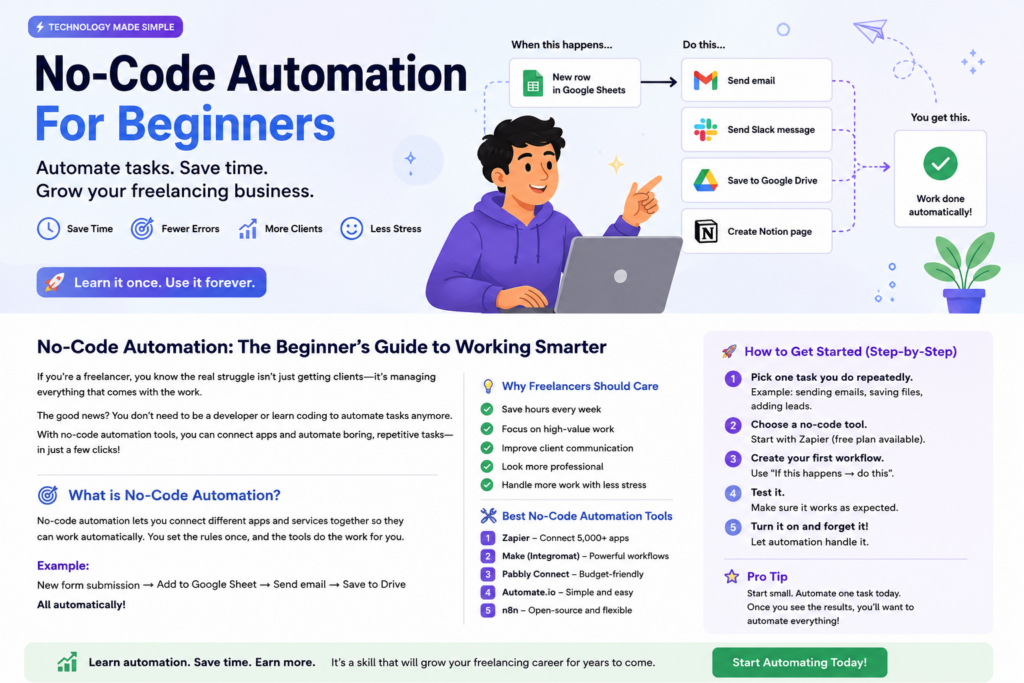
No-code automation means connecting different applications and creating automatic workflows without writing traditional programming code.
You simply create a rule such as:
When this happens → Do this automatically.
Simple Example:
A potential client fills out a contact form.
- The information is added to a spreadsheet.
- You receive an email notification.
- The client is added to your customer list.
- A follow-up task is created automatically.
Instead of doing all these tasks manually, automation can connect the process together.
Why Should Freelancers Learn Automation?
Time is extremely valuable when you work as a freelancer. Every hour spent on repetitive administration is an hour you could have spent working with clients, improving your skills, or finding new opportunities.
- Save hours every week
- Reduce repetitive work
- Make fewer manual mistakes
- Respond to clients faster
- Manage more projects efficiently
- Offer automation services to clients
Popular No-Code Automation Tools
Several platforms allow beginners to connect applications and automate workflows. The best tool depends on your needs, budget, and the applications you use.
Automation Platforms
- Zapier
- Make
- n8n
- Microsoft Power Automate
- Other workflow automation platforms
Before choosing a tool, check its current features, pricing, and supported applications. Many platforms offer free plans or free trials that beginners can use to learn the basics.
5 Simple Automation Ideas for Freelancers
1. Automate New Client Leads
When someone submits a contact form on your website, you can automatically save their information and receive a notification.
This helps you respond quickly to potential clients.
2. Automate File Organization
You can create workflows that automatically organize files into folders or notify you when a new document is uploaded.
3. Automate Email Notifications
When an important event happens, an automated email notification can remind you to take action.
4. Automate Project Tasks
When a project reaches a new stage, you can automatically create a task, update a project board, or notify a client.
5. Automate Social Media Workflows
You can organize content ideas and create workflows to help manage your social media publishing process.
How to Start Learning No-Code Automation
You do not need to learn everything at once. The best way to learn automation is to start with one real problem in your own daily work.
Step 1: Find a Repetitive Task
Think about something you do repeatedly every day or every week.
For example, sending the same type of email, updating a spreadsheet, or organizing client information.
Step 2: Choose One Automation Tool
Do not try to learn every platform at the same time. Choose one tool and understand its basic features.
Step 3: Create a Simple Workflow
Start with a simple automation:
Trigger → Action
For example:
New form submission → Send email notification.
Step 4: Test Your Automation
Always test your workflow before relying on it for important business tasks.
Step 5: Improve the Workflow
Once your first automation works, you can add more steps and connect additional tools.
How Automation Can Become a Freelance Skill
No-code automation is not only useful for your own work. It can also become a valuable service that you offer to clients.
Many small businesses perform repetitive tasks manually because they do not know how to automate them.
A freelancer who understands automation can help businesses:
- Connect business applications
- Automate lead management
- Create customer workflows
- Organize business data
- Automate notifications
- Reduce repetitive administrative work
This can become an additional freelance service alongside web design, WordPress development, digital marketing, and other online services.
Important Tips for Beginners
- Start with one simple task.
- Learn one automation platform at a time.
- Always test your workflows.
- Keep backups of important information.
- Protect private client data.
- Improve your automation skills through real projects.
Final Thoughts
No-code automation is one of the most useful technology skills for modern freelancers. You do not need to become a professional programmer to start.
By learning how to connect apps and automate repetitive tasks, you can save time, improve your workflow, and potentially offer valuable automation services to clients.
Start with one repetitive task today. Automate it, learn from the experience, and then build your next workflow.
Start Learning Automation Today
Choose one task you repeat every week and explore how a no-code automation tool can help you complete it automatically. The skill you learn today could become a valuable freelance service tomorrow.

